
Create a Character Reference Sheet for AI Video
A step-by-step tutorial for turning character source images and profile notes into a reusable AI video reference sheet.
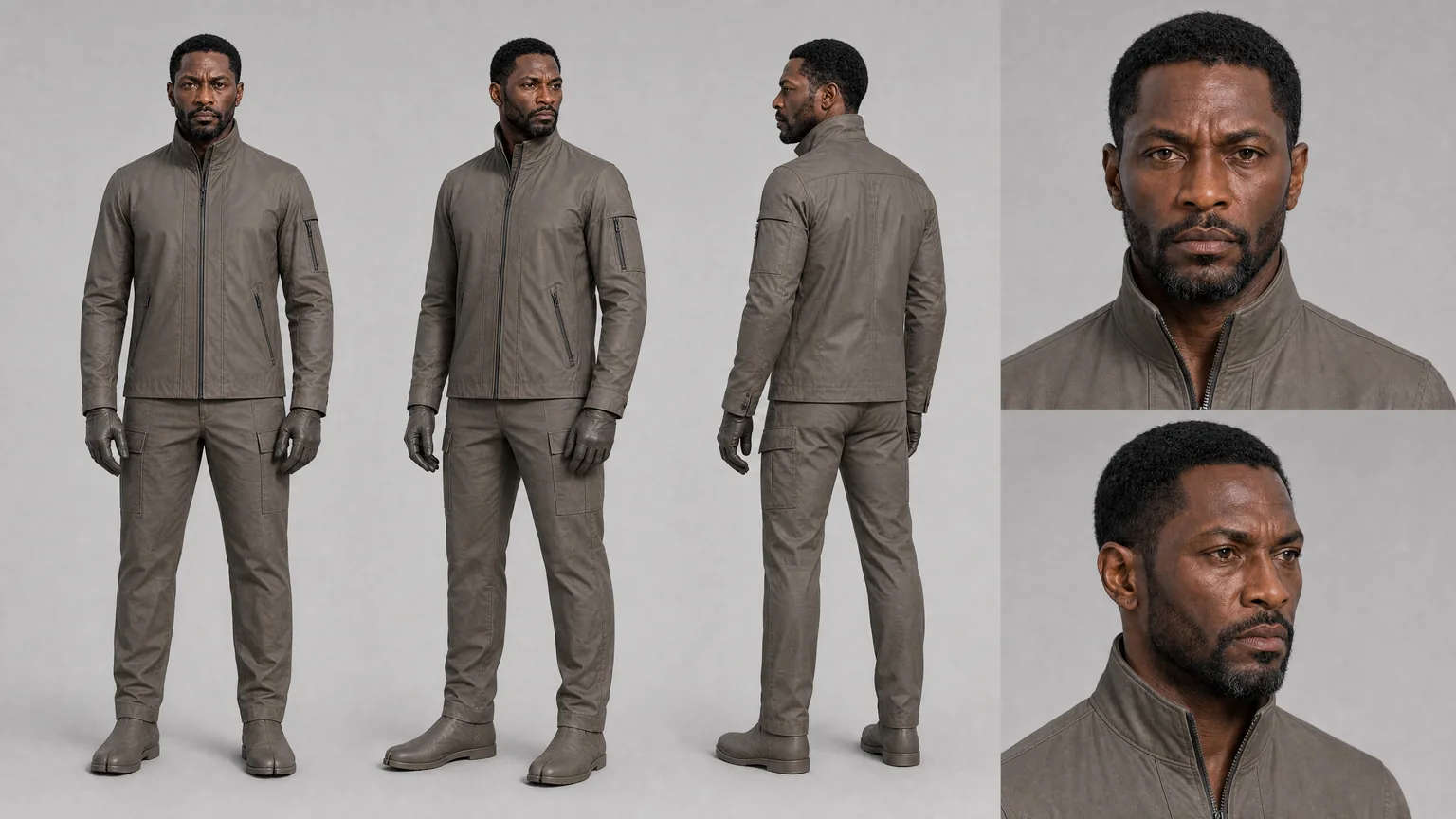
A character reference sheet gives your AI video workflow a stable visual target. It won’t make every generated take perfect, but it can help the team carry identity, wardrobe, silhouette, and performance intent from one shot plan to the next.
This tutorial shows how to prepare a character asset, create a reference sheet, and use it inside a shot workflow. It’s written for production-minded teams that need a character to survive more than one prompt.
Use this after you’ve created a project workspace and before you generate the character’s most important shots.
Key takeaways
- Start with clear source images and short character notes.
- Keep identity, wardrobe, and performance guidance separate.
- Use the sheet as a reusable reference, not as a guarantee.
- Attach the reference to shot plans where character continuity matters.
- Review takes against the character profile, not just the prettiest frame.
Step 1: choose source images with a job
Don’t start by uploading every image that looks interesting. Pick source images that explain the character.
Useful source images usually show:
- Face shape and hair
- Body silhouette
- Wardrobe or costume state
- Color palette
- A clear lighting read
- One or two expression references
Avoid mixing wildly different designs for the same character. If one image shows a raincoat, another shows formalwear, and another shows a fantasy costume, the sheet may inherit confusion. When the character has multiple wardrobe states, create a clean profile for the state that matters to the current scene.
For a recurring character, it helps to keep source images close to the intended story world. A glossy fashion portrait can be useful, but it may fight a gritty night-interior scene if the notes never explain the difference.
Step 2: write the character profile
The profile should tell the sheet what the source images mean.
Keep the notes practical:
- Character name
- Approximate age range
- Face, hair, and silhouette details
- Wardrobe state
- Props or accessories that belong to the character
- Performance range
- Details that should stay consistent
- Details that can vary by scene
Write like a director briefing a department head. “Mara wears a weathered navy field jacket, keeps her hair tied back during station scenes, and should read as alert but exhausted” is more useful than a long paragraph of mood words.
In Lotix, character assets can include profile data, source images, tags, summaries, generation guidance, active reference material, and history. Character reference sheets can be generated from source images and character profile data, then reused as canonical visual references for the production.
Step 3: generate the character reference sheet
Once the source images and profile are ready, generate the character reference sheet from the character asset.
Treat the first result as a production reference to inspect, not a final verdict. Check whether the sheet preserves the details your shots will need:
- Does the face read like the same person?
- Does the hairstyle match the profile?
- Does the wardrobe state fit the scene?
- Is the silhouette clear enough for wider shots?
- Are important accessories present?
- Is there anything that could confuse future shot prompts?
If the sheet drifts, revise the profile notes or source selection before you rely on it. A clean reference early can save many review cycles later.
Lotix uses OpenAI image generation for character reference sheets and stores generated sheets with status and provenance metadata. The important editorial boundary is simple: generated reference sheets are for characters. Locations, props, and wardrobe can still use profile data, source images, and manual reference bundles, but don’t describe them as generated reference sheets unless the product changes.
Step 4: attach the sheet to real shot plans
A reference sheet only helps if it reaches the shots that need it.
When planning a shot, attach the character reference where identity or wardrobe matters. Then write a short note explaining what the reference should guide. For example:
- “Use the sheet for face shape, hair, and jacket continuity.”
- “Preserve the tired expression range, but allow stronger backlight.”
- “Keep the wardrobe state from scene two.”
- “Use the silhouette for the wide shot; face detail is less important here.”
This keeps the model direction focused and makes review easier. If the take fails identity, you can check whether the character sheet was attached and whether the prompt explained its job.
For full shot structure, pair this tutorial with the Seedance 2.0 shot planning workflow.
Step 5: review takes against the sheet
When a generated take comes back, don’t judge it as a standalone clip. Compare it to the character reference, the shot intent, and the scene context.
Useful review questions:
- Does the character still feel like the same person?
- Did the wardrobe state hold?
- Did the performance match the shot’s emotional job?
- Did lighting, camera distance, or motion hide the details that needed to read?
- Is the take strong enough to mark selected or approved, or does it need another pass?
Lotix keeps generated videos attached to shots as takes, so the team can review with the prompt, references, settings, and review state in one production context. A director, producer, or editor shouldn’t have to guess which image guided the take.
Step 6: update the asset when the production learns something
Character references often improve as the project develops. Maybe a selected take reveals a better expression. Maybe the wardrobe changes after a story beat. Maybe the character needs a cleaner source image for close-ups.
Update the character asset when the production has a real reason. Keep the change tied to the story and label the intended use. That way, scene two’s rain-soaked jacket doesn’t accidentally become the default for every later shot.
For broader setup, use the AI video project workspace tutorial. It shows how character references fit beside locations, props, wardrobe, scenes, shots, roles, and dailies.
Frequently asked questions
Does a character reference sheet guarantee continuity?
No. It helps carry visual intent across shots, but generated video can still vary. Review each take against the sheet, the profile, and the shot plan.
Should I make one sheet for every wardrobe change?
Create separate character reference material when the wardrobe change matters to continuity. If the change is minor, profile notes and shot-level wardrobe guidance may be enough.
Can I create reference sheets for props or locations?
Current Lotix reference sheet generation is implemented for characters. Props, locations, and wardrobe can still use source images, profile data, and manual reference bundles.
Where should I use the sheet in the workflow?
Use it in shots where character identity, wardrobe, silhouette, or expression continuity matters. It doesn’t need to appear in every shot if the character is distant, obscured, or not the visual focus.
Make the character reusable
A strong character reference sheet turns a single design into a production asset. It helps the team brief shots, compare takes, and protect continuity without rewriting the character from memory.
When you’re ready to organize characters, shots, generated takes, and dailies in one workspace, Start Creating in Lotix.