

Create a Character Reference Sheet for AI Video
A step-by-step tutorial for turning character source images and profile notes into a reusable AI video reference sheet.
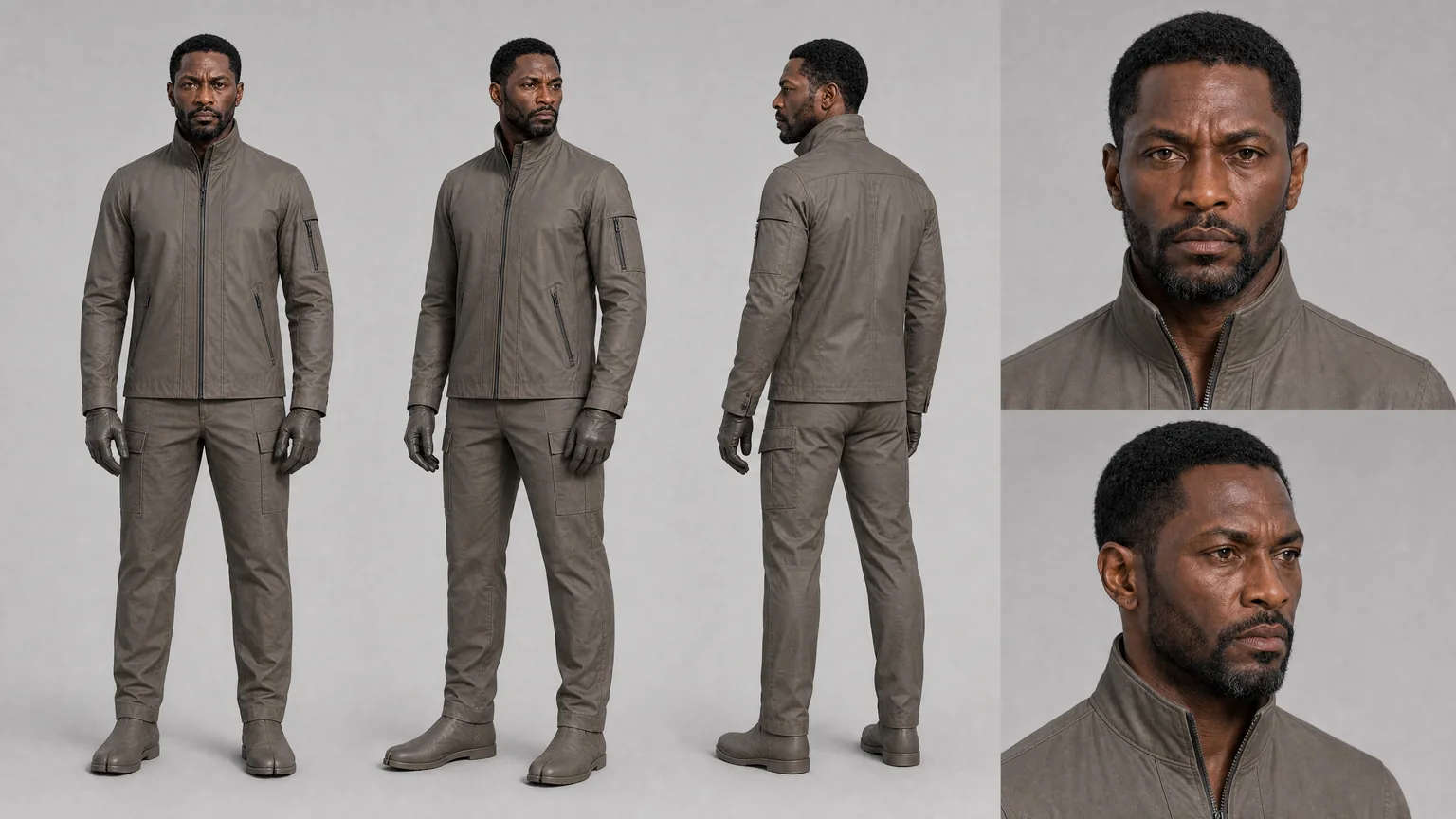
You need to create your character reference sheet long before you start planning out recurring shots. In Lotix, the built-in sheet generation combines your source images with your written character profile to establish a definitive visual baseline for any recurring character in your production.
Tackle this step right after you set up your project workspace, but make sure you do it before generating any shots where the character’s identity is heavily featured. If you want a broader look at the overall continuity strategy, check out our guide on Character Consistency in AI Video.
Key Takeaways
A truly useful character reference sheet provides your entire team with a single visual target for a character’s identity, silhouette, current outfit, and range of expressions. You will get the best results if you feed the system clean source images, concise profile notes, and a clear purpose for the shot before you start generating.
- Only use source images that actively help explain the character.
- Make sure your guidance for identity, wardrobe, and performance are kept completely separate.
- Use the generated sheet to provide review context for specific, individual shots.
- Attach the sheet directly to any shot plans where character continuity is crucial.
- When reviewing takes, judge them against the actual character profile, not just whichever frame looks the most aesthetically pleasing.
Step 1: Choose Source Images With a Job
Pick source images that actually explain who the character is, rather than just grabbing every photo that looks cool. The sheet requires stable, consistent data regarding the character’s face, hair, body shape, outfit, color palette, and expressions. If you throw in a mix of conflicting costumes or designs, you are just going to break the reference before you even try to use it for a shot.
The most useful source images usually highlight:
- The shape of the face and the hairstyle.
- The overall silhouette of the body.
- The specific state of their wardrobe or costume.
- The character’s color palette.
- A clear read of the lighting.
- One or two solid expression references.
Do whatever you can to avoid using conflicting designs for the same person. If you upload one picture of them in a raincoat, another in formal wear, and a third in a fantasy getup, the resulting sheet is going to be an absolute mess. If your character has several different outfits throughout the story, create a clean, dedicated profile for the specific wardrobe state that matters for your current scene.
For recurring characters, try to keep your source images closely aligned with the actual world of your story. A high-end fashion portrait might show great facial structure, but it’s going to clash badly with a gritty, nighttime interior scene if your profile doesn’t clarify the difference.
Step 2: Write the Character Profile
Think of the character profile as the production instructions for the reference sheet. You need to name the character, detail their identity and wardrobe, map out their expressions, and clearly separate the permanent traits from the details that might change based on lighting or the story.
Keep your notes as practical as possible:
- The character’s name.
- Their approximate age range.
- Specific details about their face, hair, and silhouette.
- The current state of their wardrobe.
- Any props or accessories that belong to them.
- Their range of performance and emotion.
- The specific details that must remain consistent.
- The details that are allowed to vary from scene to scene.
Write these notes the same way a director would brief a department head. “Mara wears a weathered navy field jacket, keeps her hair tied back during station scenes, and should read as alert but exhausted” is a far better instruction than a massive paragraph filled with vague mood words.
Once you have separated out those details, your workspace needs to actually keep them attached to the character, rather than burying them deep inside one-off text prompts. In Lotix, a character asset can hold all of this profile data, along with source images, tags, summaries, generation rules, active references, and history. Lotix takes those source images and profile notes, generates the reference sheets, and lets you reuse them as the canonical visual targets for your entire production.
Step 3: Generate the Character Reference Sheet
Do not hit generate until your character asset actually has useful source images and solid profile data. Treat the very first result as review material. Go over it closely to check their identity, hair, outfit, silhouette, and accessories to catch any weird details that might cause future prompts to misread the character.
Ask yourself if the sheet successfully preserves the details you will need for your shots:
- Does the face genuinely look like the same person?
- Does the hairstyle actually match your profile notes?
- Does the current wardrobe state fit the scene?
- Is the silhouette clear enough that it will work in wide shots?
- Are all the necessary key accessories visible?
- Is there any random detail in the image that might confuse your future prompts?
If you notice the sheet drifting from your original vision, go back and tweak your profile notes or swap out your source images before you start relying on it. Nailing down a clean reference right now will save you from enduring endless review cycles later on.
Lotix relies on OpenAI’s image generation to build these sheets and stores them right alongside their status and provenance metadata. Make sure you keep that metadata visible while you review so your team always knows exactly which notes and images resulted in that specific reference.
Step 4: Attach the Sheet to Real Shot Plans
You need to manually attach the character sheet to any shot where identity, wardrobe, silhouette, or expression consistency is going to drive the final result. The reference is only going to help if the shot notes explicitly explain its job - like telling the AI to preserve the face shape, match the jacket color, or maintain an expression.
When you are mapping out a shot, attach the reference wherever the character’s identity or outfit matters. Then, write a quick note explaining exactly what the reference is there to guide:
- “Use the sheet for face shape, hair, and jacket continuity.”
- “Preserve the tired expression range, but allow stronger backlight.”
- “Keep the wardrobe state from scene two.”
- “Use the silhouette for the wide shot; face detail matters less here.”
Doing this keeps the model highly focused and makes the review process a breeze. If a generated take completely fails on identity, you can immediately check to see if the sheet was attached and if the prompt actually explained what it was supposed to do.
If you want to dive deeper into structuring your shots, pair this guide with our Seedance 2.0 shot planning workflow.
Step 5: Review Takes Against the Sheet
Every single generated take needs to be reviewed against the reference sheet, the written profile, and the original intent of the shot. A video clip can look absolutely stunning and still be a failure if the character’s face shifts, their clothes change, the emotional beat is missed, or the camera movement obscures the very details you needed to see.
Use these questions when you are reviewing:
- Does the character still feel like the same person?
- Did the wardrobe stay consistent?
- Did the performance hit the emotional job required for the shot?
- Did the lighting, camera distance, or motion end up hiding the details that needed to be visible?
- Does this take actually deserve to be selected or approved, or does it need another pass?
Because Lotix attaches the generated videos directly to the shots as takes, your team can review the footage right alongside the prompt, the references, the settings, and the review state, all in one cohesive production context. No director, producer, or editor should ever be forced to guess which image was supposed to be guiding the take.
Once your first round of generated takes comes back, run through our full AI video takes and dailies tutorial for the complete review process.
Step 6: Update the Asset When the Production Learns Something
Whenever production evidence gives you a way to improve the reference, you should update the character asset. You might find that a selected take naturally reveals a much stronger expression, a story beat dictates a change in their wardrobe, or doing close-up work highlights that your original source images need a bit of cleanup before you generate any more footage.
Just ensure that every change is tied directly to the story, and clearly label its intended use. If a character gets their jacket soaked in rain during scene two, that shouldn’t become the default look for all future shots unless your team decides that the wet look now permanently defines them.
For a look at the bigger picture, check out the AI video project workspace tutorial. It will show you exactly how character references fit into the grand scheme of your locations, props, scenes, shots, and dailies.
Frequently Asked Questions
These FAQs clear up exactly where a character sheet is helpful, what it absolutely cannot guarantee, and when you can just rely on profile notes or shot-level guidance. Use these answers to figure out when to attach a sheet, when you need separate wardrobe references, and when you are just needlessly overloading a character asset.
Does a character reference sheet guarantee continuity?
No, it does not. It will absolutely help your team carry visual intent from one shot to the next, but AI video models can still introduce variations in a character’s identity, clothes, posture, and expressions. You still have to review every single take against the sheet, the profile, and the shot plan before you give it the green light.
Should I make one sheet for every wardrobe change?
You should create separate character reference material only when a wardrobe change impacts your continuity. Putting on a rain jacket, a uniform, a disguise, or having a heavily damaged costume usually requires its own sheet or source bundle. Minor styling tweaks, on the other hand, are usually better handled as simple shot-level notes during generation.
Can I create reference sheets for props or locations?
No. Lotix’s sheet generation feature is designed to build sheets exclusively for character assets using source images and profile data. That said, your props, locations, and wardrobe items can still hold their own profile data, source images, active references, and manual reference bundles.
Where should I use the sheet in the workflow?
Use it on shots where the audience absolutely needs to recognize the character or clearly read a specific outfit, silhouette, or expression. Feel free to skip it when the character is far away, obscured, or not the visual focus, as long as the shot plan already has enough context.
Make the Character Reusable
To make a character truly reusable, you have to treat the reference sheet like actual production memory, not just a pretty piece of extra art. Store it properly with the character, attach it only to the relevant shots, and compare your generated takes against it anytime identity, wardrobe, or expressions matter.
When you are finally ready to get your characters, shots, takes, and dailies organized into a single workspace, head over to Lotix to Sign up free.
Free workspace
Create your free Lotix workspace.
Plan your shots, manage your assets, generate takes with built-in Seedance, and keep generation spend visible with monthly tokens inside Lotix.
- Plan shots around scenes, references, and review needs
- Manage characters, locations, props, and production assets
- Generate Seedance takes with visible token usage